Raspberry Pi Camera Setup
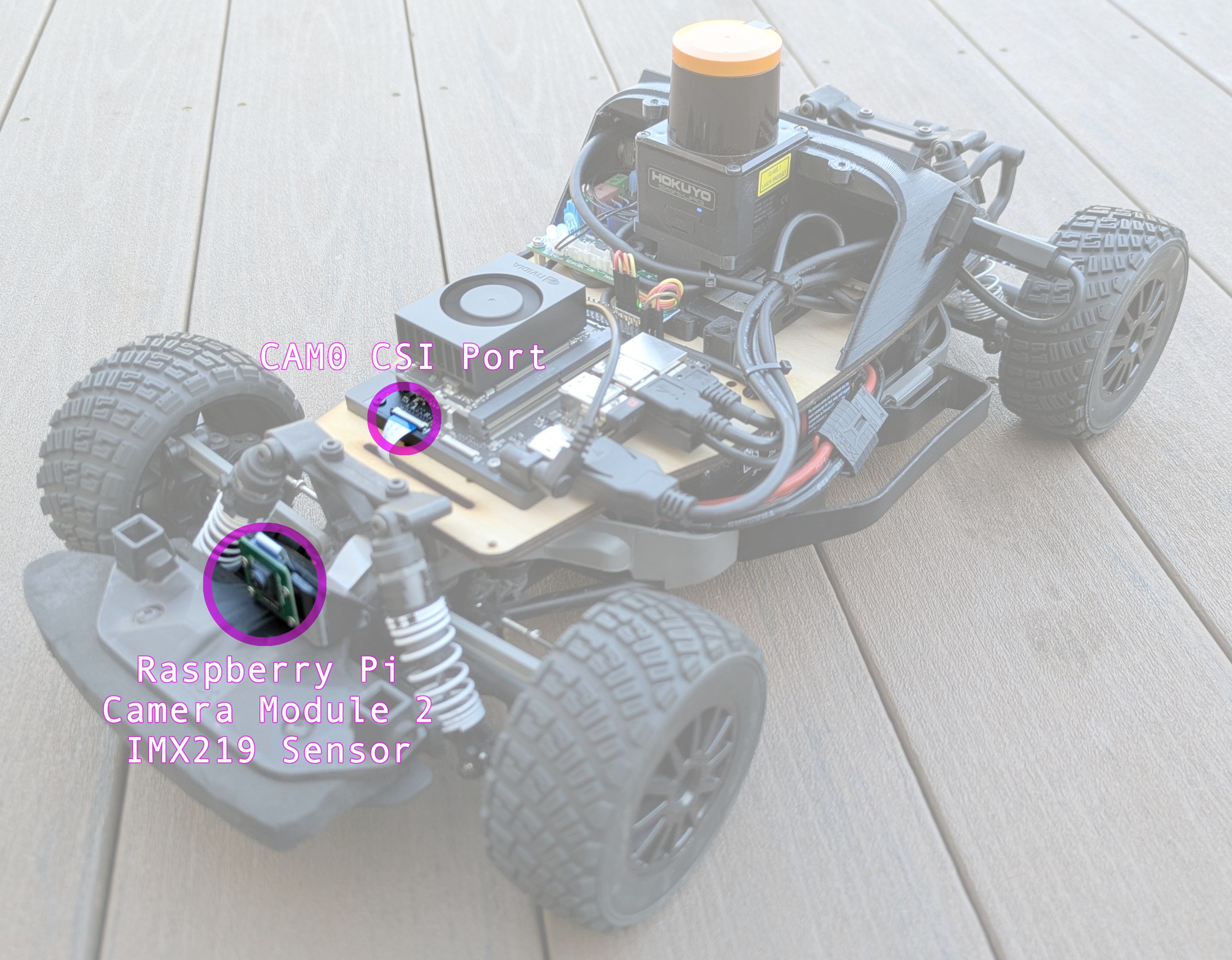
The Raspberry Pi Camera Module 2 is a popular camera option for the Autonomous Driving Platform due to its compact size, ease of use, and compatibility with the Raspberry Pi Compute Module used in the car.
Setup
This only needs to be done once per camera installation.
Run the following commands in a terminal on the car to set up the Raspberry Pi Camera Module:
sudo /opt/nvidia/jetson-io/jetson-io.py
-
Pick
Configure Jetson 24pin CSI Connector -
Pick
Configure for compatible hardware -
If you have one camera, plugged into port
cam0, pickCamera IMX219-A -
If you have two cameras, plugged into port
cam0and portcam1, pickCamera IMX219 Dual. -
Pick
Save pin changes. -
Pick
Save and reboot to reconfigure pins.
Test the Camera
After the car reboots, ensure you can read the camera device, run the command v4l2-ctl --list-devices, the expected output should include:
NVIDIA Tegra Video Input Device (platform:tegra-camrtc-ca):
 /dev/media0

vi-output, imx219 9-0010 (platform:tegra-capture-vi:1):
 /dev/video0
Then, test the camera using the following command:
gst-launch-1.0 nvarguscamerasrc sensor-id=0 ! 'video/x-raw(memory:NVMM), width=320, height=240, framerate=30/1, format=NV12' ! nvvidconv ! 'video/x-raw, format=BGRx' ! videoconvert ! 'video/x-raw, format=BGR' ! videoconvert ! xvimagesink
This command will open a window displaying the camera feed. You should see output similar to the following in the terminal:
Setting pipeline to PAUSED ...
Pipeline is live and does not need PREROLL ...
Pipeline is PREROLLED ...
Setting pipeline to PLAYING ...
New clock: GstSystemClock
GST_ARGUS: Creating output stream
CONSUMER: Waiting until producer is connected...
GST_ARGUS: Available Sensor modes :
GST_ARGUS: 3280 x 2464 FR = 21.000000 fps Duration = 47619048 ; Analog Gain range min 1.000000, max 10.625000; Exposure Range min 13000, max 683709000;

GST_ARGUS: 3280 x 1848 FR = 28.000001 fps Duration = 35714284 ; Analog Gain range min 1.000000, max 10.625000; Exposure Range min 13000, max 683709000;

GST_ARGUS: 1920 x 1080 FR = 29.999999 fps Duration = 33333334 ; Analog Gain range min 1.000000, max 10.625000; Exposure Range min 13000, max 683709000;

GST_ARGUS: 1640 x 1232 FR = 29.999999 fps Duration = 33333334 ; Analog Gain range min 1.000000, max 10.625000; Exposure Range min 13000, max 683709000;

GST_ARGUS: 1280 x 720 FR = 59.999999 fps Duration = 16666667 ; Analog Gain range min 1.000000, max 10.625000; Exposure Range min 13000, max 683709000;

GST_ARGUS: Running with following settings:
   Camera index = 0
   Camera mode  = 4
   Output Stream W = 1280 H = 720
   seconds to Run    = 0
   Frame Rate = 59.999999
GST_ARGUS: Setup Complete, Starting captures for 0 seconds
GST_ARGUS: Starting repeat capture requests.
CONSUMER: Producer has connected; continuing.
Redistribute latency...
WARNING: from element /GstPipeline:pipeline0/GstXvImageSink:xvimagesink0: Pipeline construction is invalid, please add queues.
Additional debug info:
../libs/gst/base/gstbasesink.c(1249): gst_base_sink_query_latency (): /GstPipeline:pipeline0/GstXvImageSink:xvimagesink0:
Not enough buffering available for  the processing deadline of 0:00:00.015000000, add enough queues to buffer  0:00:00.015000000 additional data. Shortening processing latency to 0:00:00.000000000.
WARNING: from element /GstPipeline:pipeline0/GstXvImageSink:xvimagesink0: Pipeline construction is invalid, please add queues.
Additional debug info:
../libs/gst/base/gstbasesink.c(1249): gst_base_sink_query_latency (): /GstPipeline:pipeline0/GstXvImageSink:xvimagesink0:
Not enough buffering available for  the processing deadline of 0:00:00.015000000, add enough queues to buffer  0:00:00.015000000 additional data. Shortening processing latency to 0:00:00.000000000.
0:00:10.8 / 99:99:99.
Running the camera node
After setting up the camera hardware, you can run the camera processing node using the following command:
ros2 run orin_rp2_csi mono_processor --ros-args -p width:=320 -p height:=240 -p framerate:=30 -p display_mode:="none"
Stereoscopic Camera Setup
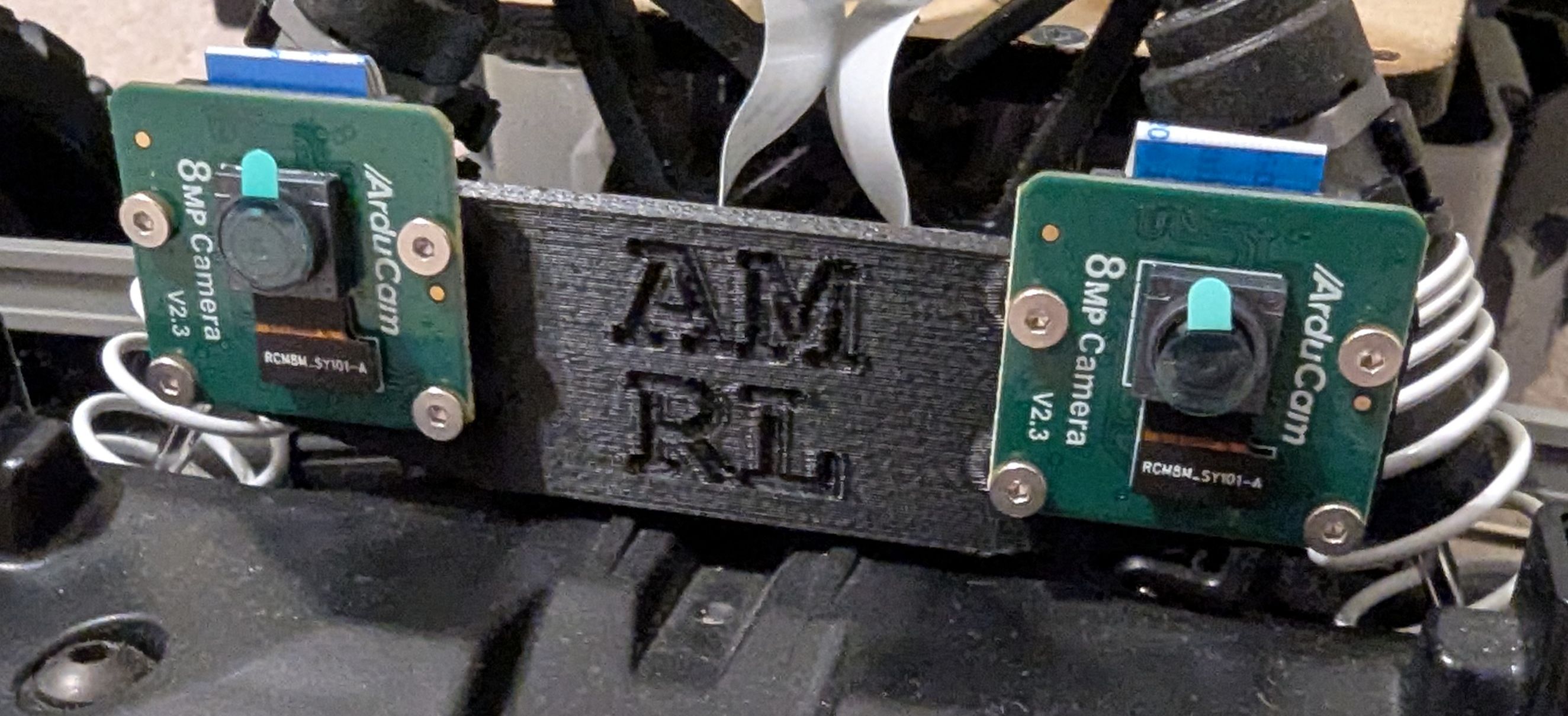
We have several stereoscopic camera setups available for the Autonomous Driving Platform that use two Raspberry Pi Camera Modules. These setups provide the hardware to compute depth. While the pi camera nodes have the framework for computing stereo depth, it is not tested. Students interested in computational geometry and computer vision are welcome to implement and test this functionality.
Troubleshooting
Captured image is invalid or empty
If you see the following error when running the mono_processor node, first try restarting the car. If that fails, re-configure the camera.
$ ros2 run orin_rp2_csi mono_processor --ros-args -p width:=320 -p height:=240 -p framerate:=30 -p display_mode:="none"
[INFO] [1760906220.374738176] [mono_processor]: MonoProcessor constructor started
Using pipeline: nvarguscamerasrc sensor-id=0 ! video/x-raw(memory:NVMM), width=320, height=240, framerate=30/1, format=NV12 ! nvvidconv ! video/x-raw, format=BGRx ! videoconvert ! video/x-raw, format=BGR ! appsink
Error generated. /dvs/git/dirty/git-master_linux/multimedia/nvgstreamer/gst-nvarguscamera/gstnvarguscamerasrc.cpp, execute:794 No cameras available
[ WARN:0@0.290] global cap_gstreamer.cpp:1728 open OpenCV | GStreamer warning: Cannot query video position: status=0, value=-1, duration=-1
[INFO] [1760906220.596398368] [mono_processor]: Successfully loaded calibration from: /home/orin/roboracer_ws/params/cameras/0/calibration.txt
MonoProcessor constructor completed
Display mode: none
Image format: raw
[INFO] [1760906220.596873920] [mono_processor]: About to initialize ImageTransport
[INFO] [1760906220.641440576] [mono_processor]: Publishing raw images to topic: camera_0/image_raw
[INFO] [1760906220.643998560] [mono_processor]: Publishing rectified images to topic: camera_0/image_rect
[INFO] [1760906220.644077184] [mono_processor]: Image format: raw
[INFO] [1760906220.644113664] [mono_processor]: About to call shared_from_this() for timer
[INFO] [1760906220.644148512] [mono_processor]: shared_from_this() succeeded
[ERROR] [1760906220.677549344] [mono_processor]: Captured image is invalid or empty