WireGuard VPN Setup
WireGuard is a modern VPN solution that allows you to securely connect to the FRI network from anywhere. Configuring WireGuard involves creating a secure tunnel between your device and the FRI network, enabling you to access your car, as if you were on campus. It also allows you to connect to your car using the same configuration regardless of how the car is connected to the internet.
-
Install WireGuard on your laptop: wireguard.com/install.
-
Create a new empty tunnel.
When the tunnel is created, WireGuard will generate a public/private key pair for you.
Copy your PUBLIC KEY and send it to the course staff. They will give you an IP address to use.
Save the empty tunnel configuration to be completed once you receive your IP address.
-
Wait for your WireGuard IP address.
Note: Curious about what an IP address is? Read the Networking guide.
-
Paste the following configuration into WireGuard.
Replace
<IP ADDRESS>with the IP address on the row of the sheet. Replace the<PRIVATE KEY>with the private key in your generated empty tunnel.[Interface] Address = <IP ADDRESS> PrivateKey = <PRIVATE KEY> [Peer] PublicKey = AANZBeRHBxUGO1W6Flq63ThnlJlxT93XNuGtqiwPz1w= AllowedIPs = 10.0.0.0/24,10.1.0.0/16,10.2.0.0/16,10.3.0.0/16 # routes all traffic from 10.0.0.[0-255] and 10.[1-3].[0-255].[0-255]. # Use DNS host lookups for regular clients: Endpoint = robofleet.csres.utexas.edu:51820 # Use the following line instead of the above on robots, to bypass host lookups: # Endpoint = 128.83.143.97:51820 PersistentKeepalive = 10Save the configuration.
-
Connect to the tunnel.
After you connect, you should see data flowing in both directions in the tunnel management interface. If there is no "Data received" after waiting a minute, double-check your configuration for typos.
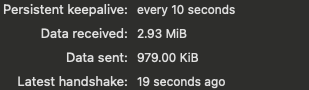
You can now access your car using its WireGuard IP address.
The cars' own VPN connection
Each car connects to the same VPN with its own key pair. The setup script sets that up, and a new car has to be registered on robofleet before you can reach it at its VPN address.
Troubleshooting
Can't reach the car with the UT VPN also on
UT's Cisco VPN client can take over the routes WireGuard needs, so a car stops answering while both are connected. Turn the Cisco VPN off while you use WireGuard.